Procedure Code Gender and Age Override (AB)
There are some hard submissions rules that have gender and age restrictions. Accuro EMR has a way of enabling you to be able to override these restrictions should you need to submit the Procedure Codes for a patient.
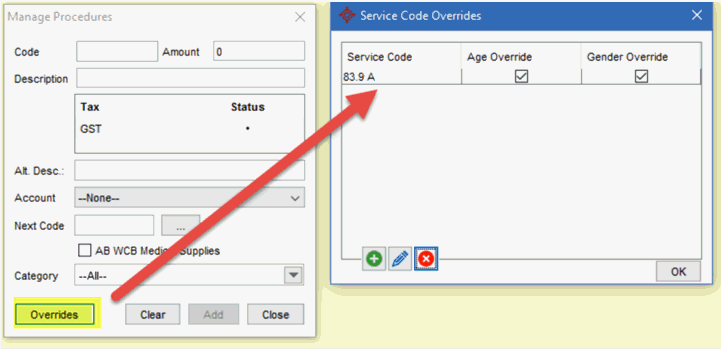
Accuro has an override option for Procedure Codes in Alberta where age and gender restrictions apply. This is located in the “Manage procedures” area of Accuro on the Service Code Overrides page, as shown below:
Access Service Code Overrides
- Press and release Alt button on the keyboard or click the Accuro Start Menu Button
 .
.
- Select Billing from the menu displayed.
- Click Billing Options to expand the list and select Manage Procedure Codes from the list displayed. The Override button is located at the bottom left of the window.
Override the Age and/or Gender
- Select Billing from the menu displayed.
- Click Billing Options to expand the list and select Manage Procedure Codes from the list displayed.
- Click the Override button is located at the bottom left of the window.
- Click the Add button
 .
.
- Type in the Procedure Code and select the checkbox for the appropriate overrides.
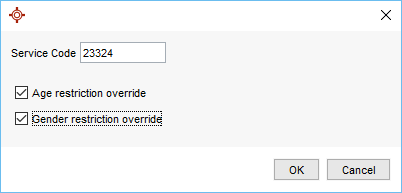
- Click OK to save your changes.